Analysis Simplified, Content Perfected

Introduction: Tired of Opening Google Analytics? Let's Solve That with Automated Notifications
"I wrote a blog post, but analyzing Google Analytics is always put off for later..." "I'm so busy with daily updates that I don't have time to check Google Analytics reports."
If you're a blogger or affiliate marketer who feels this way, I completely understand your frustration. While Google Analytics is available for free, the entire process of logging in, opening the report screen, and setting date ranges feels overwhelming, and you end up saying "maybe next time," don't you? However, to understand what content users truly want and which articles should be improved to maximize revenue, Google Analytics data is essential.
For example, information like "which articles are being read," "which articles are generating affiliate link clicks," and "what behaviors users are exhibiting on your site" directly impacts planning your next article and improving existing content. Without looking at this data, your efforts might not bear fruit.
What I'd like to propose is a system where Google Analytics data "comes to you" automatically instead of you having to "go and check" it. In this article, I'll introduce how to automatically send key Google Analytics reports to your Discord channel daily or weekly. With this system, you can understand user trends just by checking Discord, without having to log into Google Analytics. This reduces your daily workload while enabling effective site improvements based on data.
Why Many Bloggers Give Up on Google Analytics and Can't Leverage Its Power
Many bloggers and affiliate marketers have implemented Google Analytics but hardly look at it. When you work hard writing articles but neglect analytics, you miss out on reader reactions and truly needed information.
The main reasons for giving up on Google Analytics can be summarized as its complex interface andnot knowing what to look at. Those who were accustomed to Universal Analytics (UA) tend to be particularly confused by Google Analytics's event-based approach and the high degree of freedom in report screens.
For instance, to get the information you want to know—like "which articles are being read" or "where users are coming from and where they're dropping off"—you need to navigate between multiple report screens or create custom reports. Many people also find it difficult to extract "essential insights" that are useful for blog improvement from the massive amount of data.
As a result, it becomes "too much trouble to open Google Analytics" and "can't spare time for analysis in a busy schedule," leading to valuable data going to waste. However, if you can solve this challenge, your blog should be able to grow much more significantly.
Streamline Analysis Work to Spend Time on Quality Content Creation
Certainly, to achieve results in blogging and affiliate marketing, you want to spend time on "offensive" tasks like article writing and keyword selection. However, to make that "offense" more effective, "defense"— understanding user behavior data—is also essential.
Without looking at Google Analytics data, you might miss opportunities like understanding why certain articles have high bounce rates or why specific keywords bring traffic but don't lead to conversions. Questions like "Why is the bounce rate high for this article?" or "Why does this keyword bring a lot of traffic but no conversions?" remain vague without data.
You don't need to spend precious time solely on data analysis. What you should really focus on is creating valuable content for readers based on insights gained from that data. By smartly streamlining analysis work, you can allocate more time to "quality content creation" that accurately provides information users truly seek, ultimately accelerating your site's growth.
From "Going to Check" to "Data Delivered" - Benefits of Discord Integration for Report Automation
"Google Analytics was implemented, but I hardly look at it..." Many bloggers and affiliate marketers feel this way. While busy with content creation and social media management, finding time to open Google Analytics's admin panel and analyze data inevitably gets pushed to the back burner. However, this "go and analyze" hassle is the major barrier preventing data utilization.
Here's where I'd like to propose integrating Google Analytics reports with Discord for automatic delivery. With this system, you no longer need to "go check" Google Analytics's admin panel. Instead, important reports you've configured (like popular article rankings, traffic sources, conversion numbers, etc.) will "arrive" in your Discord channel daily or weekly at set times.
The biggest benefit of this automation is minimizing barriers to information access. When you open Discord, you can instantly check the latest performance data, allowing you to quickly understand "what articles are readers currently interested in?" and "which traffic sources are seeing increased access?" This enables you to get timely hints for content improvement and next article planning, making it possible to provide articles that meet reader needs promptly.
By eliminating the hassle of "going to check" Google Analytics data and utilizing information that "comes to you," your content creation will evolve into something more data-driven and efficient.
How to Automatically Send Google Analytics Data to Discord Regularly
Many bloggers and affiliate marketers find "going to check Google Analytics" troublesome. However, to understand what content users truly want, Google Analytics data analysis is essential. Today, I'll explain the specific system for automatically sending Google Analytics data to Discord regularly. With this integration, let's lower the barrier to data analysis and use it for your blog management.
The core of this system consists of three steps: "Google Analytics Data Retrieval" → "Data Processing" → "Sending to Discord".
Step 1: Google Analytics Data Retrieval
The most convenient and versatile method for retrieving data from Google Analytics is using Google Apps Script (GAS). With GAS, you can programmatically and automatically retrieve important metrics like page views, user numbers, and referral sources for specific periods by hitting Google Analytics's Reporting API. For example, you can get "top 10 pages by views for the past 7 days" or "session numbers by traffic source."
Step 2: Data Processing
Next, process the retrieved data into a format that's easy to view in Discord. Data retrieved from APIs is usually in JSON format, which may have low visibility as-is. Format it within GAS and convert it to text data that can be understood at a glance, such as ranking-format lists or summaries.
Step 3: Sending to Discord
Finally, send the processed data to Discord. This uses Discord's Webhook functionality. Issue a Webhook URL from your Discord server settings, and simply send a POST request with the formatted data from your GAS script to that URL. This automatically posts regular reports to your specified channel.
With this integration, you can get the latest data feedback just by opening Discord without having to open Google Analytics every time. This allows you to efficiently run a cycle of quickly understanding pages and keywords that users are highly interested in and applying them to your next content strategy.
If SEO monitoring is your main goal, read our guide on Google Analytics Discord integration for SEO monitoring or check our guide: SEO Action Guide: Detect Changes and Fix Quickly via Discord.
Just Looking at Notifications Isn't Enough! Analysis Techniques to Find "Articles Readers Really Want to Read"
Great job setting up Google Analytics reports to be sent to Discord! Many people might be looking at each notification thinking, "Interesting, this article is being read." However, just looking at notifications leaves valuable data unused. Without understanding whether your articles truly resonate with readers or if there's a disconnect from what they really want to know, you can't make concrete improvements.
What's important is reading the "reader intent" behind the notifications. You need a perspective that goes beyond just which articles were read most, diving deep into why they reached those pages, how much time they spent there, and what actions they took afterward.
For example, instead of just looking at simple page view numbers, pay attention to "Average Engagement Time" and "Engagement Rate." Articles with high view numbers but low engagement might indicate a gap between reader expectations and content. Conversely, articles with moderate view numbers but high engagement might represent themes worth further exploration due to high reader satisfaction.
Don't let Discord reports end up as mere "notifications"—by combining these metrics, you can find hints about "articles readers really want." In the next step, I'll explain how to derive concrete improvement strategies based on these hints.
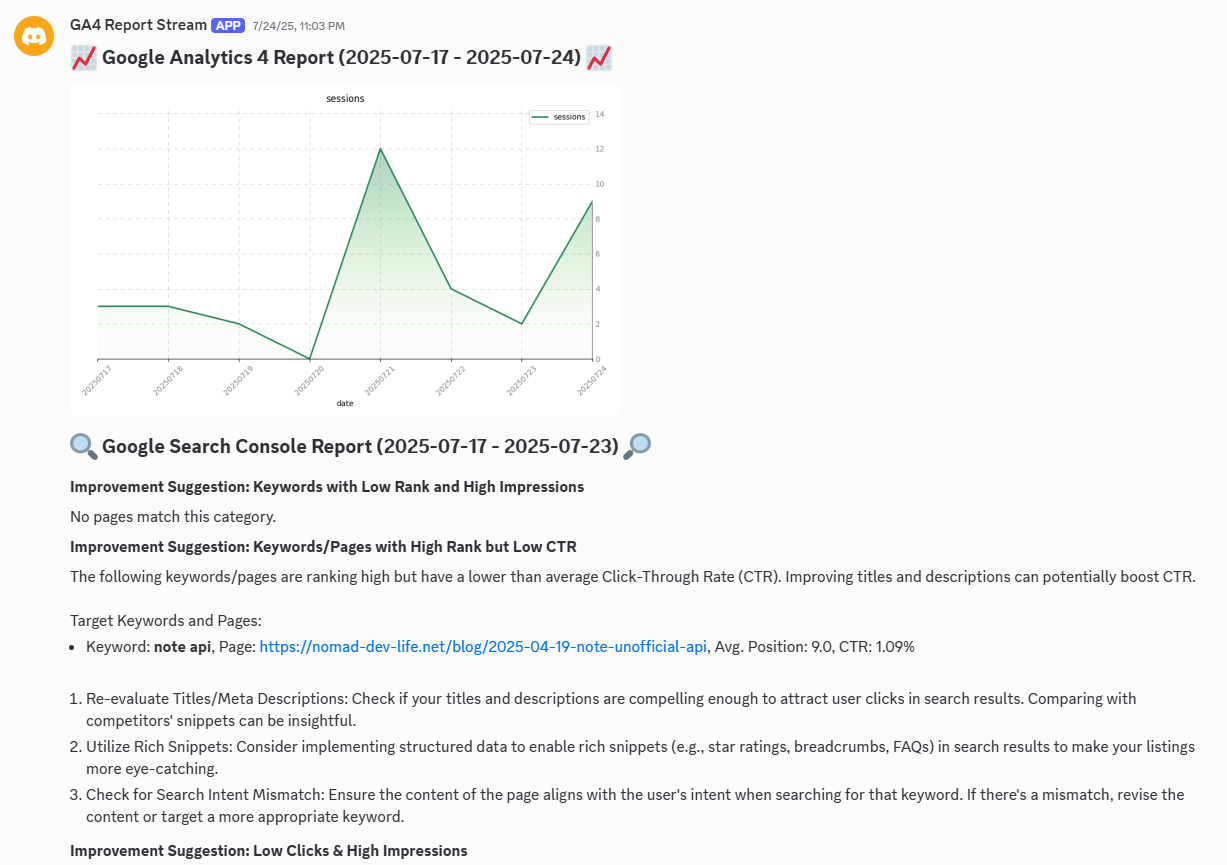
Google Analytics Report Stream provides detailed engagement metrics directly in Discord
Conclusion: Make Data Your Ally and Take Blog Management to the Next Level
Google Analytics data holds the key to your blog's growth, but many people have felt "it's too troublesome to open" or "I don't know how to use it even after looking at it." However, with the Discord integration introduced today, these challenges can be solved at once.
Once key Google Analytics reports automatically arrive in your Discord channel daily or weekly, you no longer need to open Google Analytics's admin panel. Important information like "which articles are being read most," "which articles have high bounce rates," and "what search keywords are driving traffic" gets pushed to your usual communication tool.
This allows you to naturally notice data changes and immediately get hints for content improvement. Actions like "This page is getting more access, so let's write related deep-dive articles" or "This keyword brings a lot of traffic but has low CVR, so let's modify the title and lead" become executable quickly and without hassle.
Discord integration isn't just automation—it's a powerful system for making data-based decision-making part of your daily workflow. When you can provide truly sought-after information in the format readers want, your blog's engagement and revenue will steadily improve.
Why not start data-driven blog management based on solid evidence, not just intuition and experience? Implement this integration and take your blog management to the next level.
Would you like to send Google Analytics data to Discord automatically?
With GA4 Report Stream, you don't need to create a program in GAS to retrieve your Google Analytics data and send it to your Discord. Simply connect Google Analytics and Discord to GA4 Report Stream, and your Google Analytics metrics will be sent to Discord immediately. Give it a try!
Get Started with GA4 Report Stream